

Key Takeaways!
- Dayparting is scheduling ads to run at specific times of day.
- By avoiding low-performing hours and focusing on high-intent periods, advertisers can maximize return on ad spend (ROAS).
- Analyzing historical performance (CTR, conversions, peak hours) helps identify the most effective time slots and eliminate wasted ad spend.
- Weekdays and weekends show different user intent—B2B performs better during business hours, while B2C often performs better on weekends.
- Successful ad scheduling requires regular monitoring, small adjustments, and refining strategies based on real data.
Ever noticed how the same ad can feel spot-on at one moment and completely irrelevant the next? That’s where dayparting comes in. It’s all about showing your ads at the right time, when your audience is actually paying attention and ready to act. Instead of running ad campaigns 24/7 and hoping for the best, you can be more intentional with your timing.
In this guide, we’ll break down what dayparting is, its benefits, and how to schedule your ads smartly so you get better engagement, reduce wasted spend, and ultimately see stronger returns from your campaigns.
What is Dayparting in Digital Advertising?
Dayparting, also known as ad scheduling, is an advertising strategy that lets advertisers schedule their ads to run at specific times or periods when their audience is most active.
Advertisers using dayparting saw a 6% increase in click-through rate (CTR), a 23.1% lift in conversion rate, and a 4.2% improvement in return on ad spend (ROAS)” Source: DoorDash Ads.
Instead of showing ads all the time, advertisers focus on moments when their audience is most active and more likely to take action.
Benefits of Dayparting for Advertisers
Scheduling online ads is a practice widely used by advertisers because it offers clear advantages. Let’s explore the benefits it provides.
1. Increased Engagement and Visibility
Does ad timing affect performance? Yes, it does. Running ads when your target audience is most active increases visibility, engagement, and clicks. Proper timing ensures your message reaches users at the right moment, which improves overall campaign performance.
Here’s an easy way to understand how engagement and visibility increase through dayparting.
- Right Audience, Right Activity, Right Time: Ads reach users when they are online.
- Higher Click-Through Rates (CTR): People are more likely to click on ads when they are attentive.
- Better Ad Recall: People remember ads more when they see them at the right time.
- Increased Conversion Chances: Proper timing can lead to more sign-ups and purchases.
2. Improved ROI
With dayparting, you spend money only during the hours that bring the best results. This means your ads are shown when your audience is more likely to click, buy, or take action.
As a result, you get better returns on the same budget. Instead of wasting money on low-performing hours, you focus on high-impact hours, which improve your overall return on investment (ROI).
3. Reduced Ad Spend
Dayparting also helps cut unnecessary costs by avoiding hours when your audience is less active. There’s no point running ads at times when people are unlikely to see or engage with them. By turning ads off during those periods, you save money.
This makes your advertising more efficient, as you’re only paying for time slots that actually contribute to your campaign goals.
How Dayparting Works in the Digital Ad Ecosystem
To use ad scheduling effectively in your campaigns, it’s important to understand how it works. Here’s how dayparting functions.
Step 1: Select an Ad Network with Dayparting Capabilities
One of the first things to check when choosing an ad network is whether it offers ad scheduling. Some less advanced ad networks may not offer this option, and in some cases, they may not even support basic daypart features. Overall, limited ad scheduling flexibility can hinder the performance of online ad campaigns.
When evaluating an advertising network, focus on its dayparting capabilities. Here are key points to consider:
- Flexible scheduling options: Ability to choose specific days and time slots for running an ad campaign.
- Hours control: It lets you fine-tune ad campaigns based on performance at different hours of the day.
- Time Zone: Ensures ads run according to your target audience’s local time, not just any time.
- Easy editing and adjustments: Ability to quickly update ad schedules without any hassle.
Step 2: Set Up Your Ad Campaign
Once you’ve signed up with an ad network that offers dayparting, the next step is to create and schedule your advertising campaign. To simplify the process, let’s look at an example focused on:
- What to advertise: A Dating Platform
- Advertising network: 7SearchPPC
In this scenario, you will learn how ad scheduling works for a dating ad campaign on 7SearchPPC.
Step 3: Create an Advertising Campaign
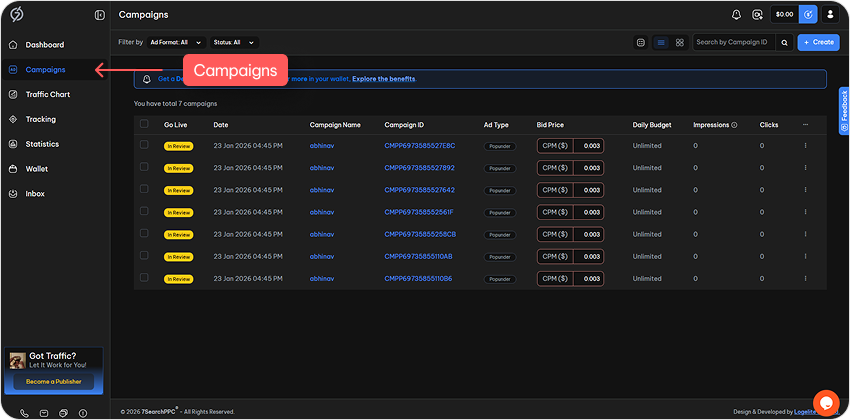
On the 7SearchPPC advertiser dashboard, go to the Campaigns section. On the right-hand side, click Create to start setting up the dating ad campaign.
Step 3.1: Now provide the Information Needed
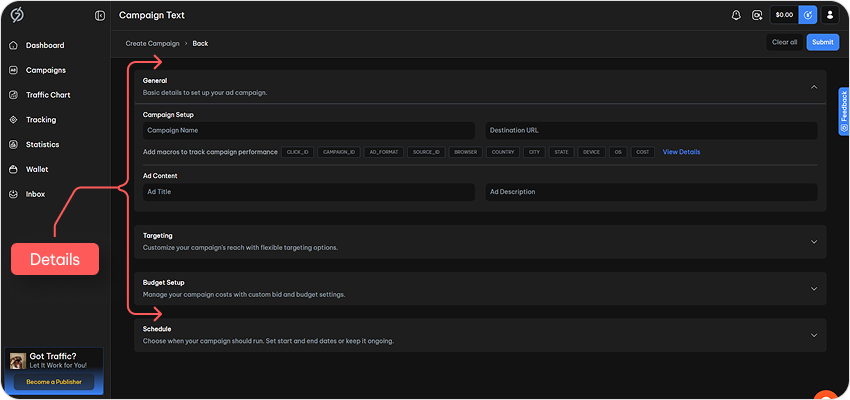
After clicking ‘Create,’ follow the steps below to set up the ad campaign.
- Choose an Advertising Format: Select the type of ad you want to run.
- Fill Out Campaign Details:
- Campaign Name
- Destination URL
- Ad Title
- Ad Description
- Targeting Options
- Budget Setup
(We have selected the text ad format for this example. Campaign setup options may vary depending on the ad format chosen in 7SearchPPC.)
Step 4: Schedule Your Ad Campaign
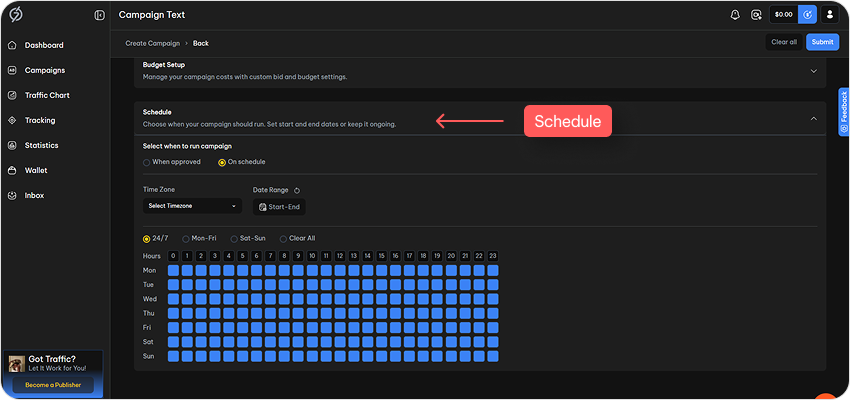
Once all the required details have been entered, scroll down to locate the Schedule option. Upon clicking this option, several additional choices will be displayed.
Step 4.1: Time Zone
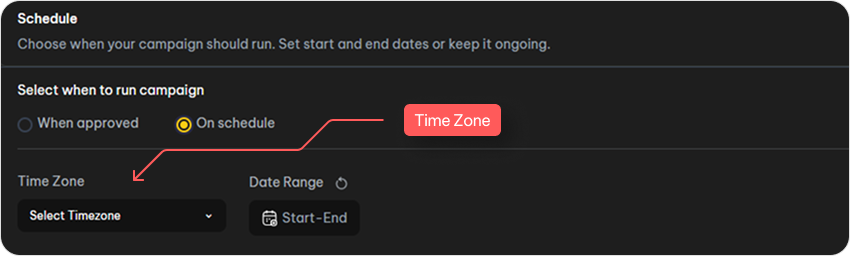
Select the time zone in which you want your dating ad campaign to run. This ensures your ads are shown to your audience at the right time.
Step 4.2: Date Range
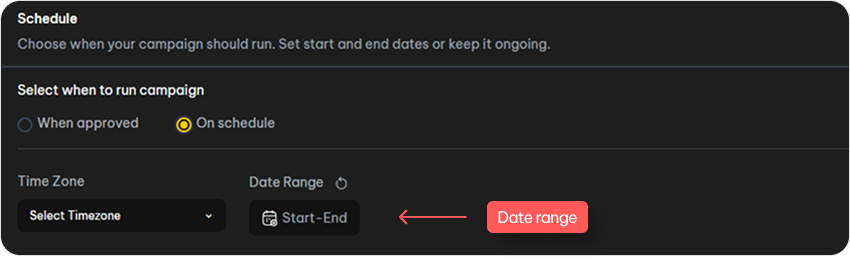
Select the start and end dates for your dating ad campaign. These dates specify how long your ads will run.
Step 4.3: Days and Times

After selecting the time zone and date range for the dating campaign, specify the exact days and times you want your ads to run. For example:
- On Monday at 1:00 PM, the ads will be displayed.
- On Friday at 9:00 AM, the ads will be displayed.
This scheduling ensures that your ads are shown only on the selected days and at the chosen times, giving you precise control over your campaign.
Step 5: Submit and Launch
Your ad schedule is now set, click Submit and your campaign will run exactly as specified.
Common Dayparting Mistakes to Avoid
Ad scheduling isn’t about choosing random hours—it requires strategy, testing, and audience insight. Many advertisers make common dayparting mistakes that hurt performance. Here is how you can avoid common mistakes when ad scheduling.
1. Ignoring Time Zone Differences
Running ads in a single time zone while targeting audiences across multiple regions can result in ads being shown at ineffective times.
How to avoid it: Always align your ad schedule with the time zones of your target audience. If you’re targeting multiple regions, consider creating separate campaigns or adjusting schedules accordingly.
2. Relying on Assumptions Instead of Data
Many advertisers assume that when their audience is active (e.g., “people shop at night” or “B2B works 9–5”), which can lead to poor performance.
How to avoid it: Use real performance data from popular tools. Focus on conversion data rather than just clicks to determine the most effective time slots.
3. Overlooking Ad Scheduling Features in Ad Networks
Some advertisers invest in ad campaigns without checking whether the platform supports dayparting.
How to avoid it: Before choosing an ad network, confirm that it offers ad scheduling features. Not all platforms prioritize this capability, but it is essential for optimizing performance.
4. Ignoring Seasonality and Key Events
Audience behavior changes during holidays, sales periods, and major events. Failing to adjust schedules can reduce the effectiveness of your campaigns.
How to avoid it: Adapt your ad schedule during key events such as holidays, major sales, or seasonal campaigns. Also, pay attention to weekends, as audience activity often differs from weekdays.
5. Failing to Continuously Test and Optimize
Many advertisers stop testing after identifying a “perfect” schedule, assuming it will remain effective over time.
How to avoid it: Continuously test and refine your ad scheduling. Audience behavior evolves, so regular optimization is necessary to maintain performance.
How to Measure Dayparting Success
Measuring success is crucial when scheduling digital ads. Let’s take a look at some of the key points that help you measure the success of your ad scheduling.
Identify the Intended Result
When assessing success, focus on the outcomes you aim to achieve. To understand the complete picture, monitor these specific metrics during the active hours of your campaign.
- ROAS / ROI: Is the revenue generated worth the spend during these periods?
- CPA (Cost Per Acquisition): Are you acquiring customers at a lower cost during these times?
- CPC (Cost Per Click): Is the bidding less competitive (cheaper) or more expensive during your peak times?
- Engagement Rate: Are users interacting more, or simply scrolling past?
- Conversion Rate: Analyze whether user conversions like sign-ups, purchases, or deposits are rising during these hours.
If these metrics show positive results, it means you’re achieving success through dayparting.
Analyze Ad Budget Reduction
One of the primary goals of dayparting is to stop spending money during periods when ads are ineffective. Success can be measured by how much unnecessary spending you eliminate.
If your overall ad spend decreases while maintaining or improving results through ad scheduling, your strategy is working.
Focus on the hours when ads were turned off. If those periods previously had high spend but low or zero conversions, the savings from eliminating that spend represent your primary gain.
Measure Dayparting Success Through A/B Testing
Split testing, also known as A/B testing, can be very beneficial for advertisers when measuring the effectiveness of their ad scheduling. This kind of testing helps determine the highest-performing ad campaign, whether it is scheduled or regular.
Let’s take an example of split testing to make things clearer for you.
| Test Component | Ad Campaign (A) | Ad Campaign (B) |
|---|---|---|
| Schedule | 24/7 | Specific peak hours (9 AM to 5 PM) |
| Budget | $120 | $120 |
| Audience | Same demographics/interests | Same demographics/interests |
| Creative | Identical | Identical |
| Clicks | 1500 | 1100 |
| Conversion | 60 | 95 |
| Cost per conversion | $2.00 | $1.26 |
Analysis of the results:
Even though campaign B got fewer clicks:
- It got more conversions.
- It achieved a higher conversion rate.
- It had a lower cost per conversion.
This indicates that users are more engaged and have higher intent during the scheduled time frame, as Campaign B aligns with the hours when they are most likely to take action. In conclusion, you can;
- Shift budget to high-performing hours
- Reduce wasted spend during low-conversion times
Right Time, Right Ads: Successful Dayparting Strategies

Dayparting is one of those tactics that sounds simple—“show ads at the right time”—but gets powerful (and tricky) once you actually use it. A good ad scheduling strategy isn’t just about turning ads on/off; it’s about matching user intent, behavior, and conversion likelihood to specific hours of the day.
Here’s how successful dayparting usually works in practice:
1. Analyze Historical Data
Analyzing historical audience data is essential for understanding user behavior, such as what your audience prefers, what resonates most with them, and when they are most active. The primary goal is to uncover patterns that indicate when people are most likely to take the desired action. Before setting up dayparting ads, focus on identifying:
- Peak hours: When your audience is most active and likely to convert.
- High CTR time: What time generates the strongest engagement?
- Low-performing periods: Find out the time period when people are least active.
By aligning your schedule with these insights, you can maximize performance and avoid wasting budget on low-impact time slots.
2. Segment Weekdays vs Weekends
User intent and behavior vary significantly between weekdays and weekends, so aligning your ad schedule with these patterns can improve performance.
- Weekdays (Monday–Friday): During working days, users are generally more task-oriented and focused. This is especially relevant for B2B campaigns, where decision-makers are active during business hours.
- Weekends (Saturday–Sunday): Users have more spare time and are more likely to browse, shop, and engage in recreational activities. This often leads to higher engagement and conversions for iGaming, e-commerce, entertainment, and lifestyle products.
Analysis of Meta Ads shows peak weekday engagement at 9-10 AM and 3-4 PM during work breaks, and at 7-9 PM, when users chill out socially.
Weekends peak in mornings (10 AM-12 PM) for relaxed browsing and Sundays 6-8 PM as people prepare for the week ahead.
Source: Clickhive.
3. Test and Refine
Testing and refining are crucial aspects of ad scheduling. You need to invest in testing to understand when your audience is most interested and most likely to click on ads. Here are some points to consider when testing and refining your ad scheduling strategy.
- Conservative adjustments: Make small, data-driven changes gradually, review performance regularly, avoid big shifts, and optimize ad timing step by step for better efficiency.
- Let the data guide you: Instead of guessing, look at what times are actually working well and slowly put more budget there.
- Keep checking every couple of weeks: Every 7 to 14 days, take a quick look at the results so you can spot what’s improving or dropping.
- Go step by step: Don’t make big changes all at once. Make small tweaks so you don’t end up wasting money on time slots that don’t perform well.
Conclusion
Dayparting your ads simply means showing them at the times when your audience is most active. It helps you schedule ads on the right days and hours, so they’re more likely to be seen and clicked. By watching when people engage the most, adjusting for weekdays and weekends, and regularly testing what works, you can steadily improve your results and get better performance from your campaigns.
Frequently Asked Questions (FAQs)
Q1: What is dayparting in ads?
Ans: In advertising, dayparting plays a crucial role by ensuring ads are shown when the audience is most active, improving engagement and conversions.
Q2: What are the benefits of dayparting?
Ans: When you schedule your ads smartly, you can get more clicks, better returns on your investment, and avoid wasting money on low-performing hours. It also helps you target the right people at the right time, which often leads to more conversions.
Q3: How does ad scheduling improve ROAS?
Ans: Ad scheduling improves advertisers’ ROAS by focusing ad spend on high-performing time slots, reducing wasted impressions, and increasing conversions.
Q4: How to schedule ads for better ROI?
Ans: Advertisers should analyze historical data, audience behavior, and performance metrics to identify peak engagement and conversion times.
Q5: What is the impact of ad scheduling on CTR and conversions?
Ans: Ad scheduling shows ads at peak times when users are active, increasing clicks and improving chances of getting more conversions.